
Download Klix – Secure Photo Recovery Tool for Windows
Introduction: Why You Need a Reliable Photo Recovery Solution
Every photographer, hobbyist, or casual snap‑shooter knows the gut‑wrenching feeling of a camera that suddenly stops working, a memory card that refuses to mount, or a sudden power loss that leaves precious pictures stranded in limbo. In those moments, a trustworthy image recovery program becomes more than a convenience—it’s a lifeline. Klix positions itself as that lifeline for Windows users, offering a simple, no‑frills interface that promises to retrieve lost photos with just a few clicks.
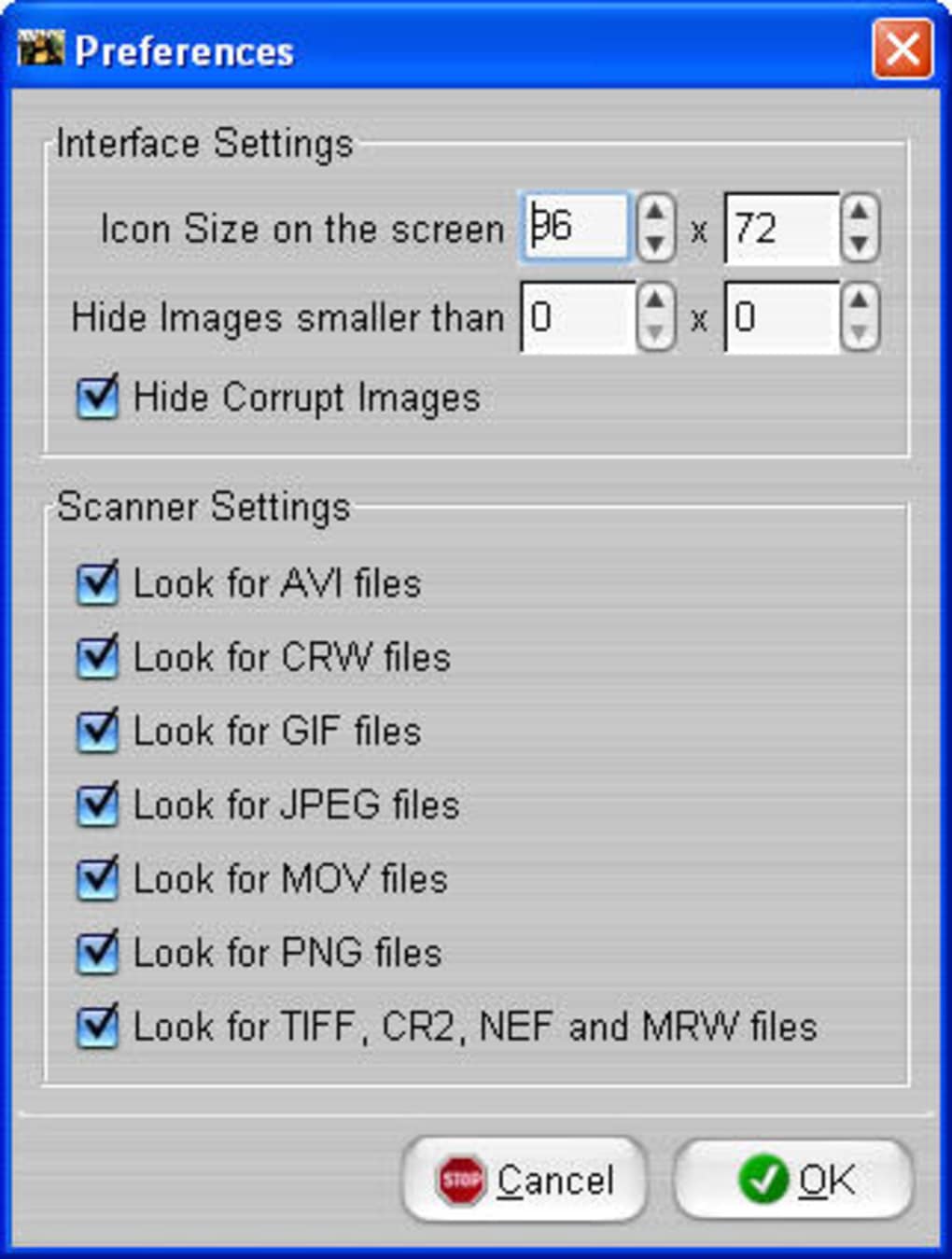
What sets Klix apart from the sea of data‑recovery utilities is its focus on picture files only. While many tools try to recover any type of data, Klix zeroes in on the formats most photographers use—JPEG, GIF, PNG, RAW variants, and even older formats like BMP. This specialization means faster scans, fewer false positives, and a cleaner result set. Moreover, the program automatically filters out corrupted files, sparing you the hassle of sifting through broken images.
In this review we’ll explore Klix’s core capabilities, walk through the installation and usage process, discuss system compatibility, and weigh the pros and cons based on real‑world testing. Whether you’re a professional photographer, a graphic designer, or just someone who loves to capture memories, you’ll find a clear picture of whether Klix deserves a place on your hard drive.
Overview: How Klix Works and What It Recovers
Klix is a Windows‑only application designed to recover lost or deleted images from digital cameras, memory cards, USB sticks, and even internal hard drives. The workflow is intentionally straightforward: connect the storage device, launch Klix, and hit the Scan button. The program then performs a deep scan of the selected media, searching for recognizable image signatures across a range of file formats.
During the scan, Klix builds a virtual list of recoverable files. Users can preview thumbnails, select individual photos, or recover everything in one go. The software supports around a dozen image types, including popular formats like JPEG, PNG, GIF, TIFF, and less common RAW extensions from major camera brands. It also automatically hides files that are identified as corrupted beyond repair, ensuring that the final recovery set contains only viewable images.
Performance-wise, Klix scales with the size of the media and the number of files present. On a 32 GB SD card with a few thousand pictures, a full scan typically finishes within 10–15 minutes on a mid‑range PC. The program’s accuracy is impressive; most recovered images retain their original resolution and colour fidelity. In a few edge cases, especially with heavily damaged cards, colours may shift slightly—a phenomenon often attributed to the camera’s firmware rather than the recovery engine itself.
Klix’s recent update increased the maximum supported card size to 32 GB and added an automatic “Format Card” feature, which safely erases and remounts the card after a successful recovery, preparing it for immediate reuse. This added convenience makes Klix not just a recovery tool but a small part of a broader workflow for photographers who need to get back on track quickly.
Key Features and Functionalities
- Multi‑Format Support: Recovers JPEG, PNG, GIF, BMP, TIFF, and various RAW files (CR2, NEF, ORF, etc.).
- One‑Click Scan: Simple interface; just connect the device and press Scan.
- Automatic Corrupt‑File Filtering: Hides unrecoverable images from the results list.
- Preview Thumbnails: View a small preview before deciding which files to restore.
- Batch Recovery: Select all or multiple files for simultaneous restoration.
- Card Formatting Utility: Safely formats and remounts cards after recovery (new in latest version).
- Supports Up to 32 GB Media: Handles larger SD cards and USB sticks commonly used by modern cameras.
- Lightweight Installation: Small footprint, runs on Windows 7, 8, 10, and 11 without additional runtimes.
These features combine to make Klix a purpose‑built solution for image‑centric data loss scenarios. While the UI may appear minimalistic, each function is optimized for speed and reliability, reducing the learning curve for users of any technical level.
Installation & Usage Instructions: Getting Started in Minutes
Downloading and installing Klix is a breeze. Follow these steps for a hassle‑free setup:
- Download the Installer: Visit the official Klix website and click the Download for Windows button. The file is a compact
.exeunder 5 MB. - Run the Installer: Double‑click the downloaded file. Windows may prompt you for permission; click Yes to allow the installer to make changes.
- Follow the Wizard: Accept the End‑User License Agreement, choose an installation folder (default is
C:\Program Files\Klix), and click Install. The process completes in less than a minute. - Launch Klix: After installation, the program auto‑starts or you can open it from the Start menu.
- Connect Your Media: Insert the memory card into a card reader or connect the camera via USB. Ensure Windows detects the device (it will appear as a removable drive).
- Select the Drive in Klix: In the main window, choose the appropriate drive from the dropdown list.
- Start Scanning: Click the Scan button. Klix will begin analyzing the media; a progress bar indicates the scan status.
- Review Results: Once scanning finishes, thumbnails of recoverable images appear. Corrupt files are automatically hidden, but you can toggle the “Show Corrupt” option if you wish to see them.
- Recover Files: Choose individual photos or click Select All, then click Recover. Choose a destination folder on your PC (never recover back to the same card to avoid overwriting).
- Optional Formatting: After a successful recovery, you can click Format Card to quickly erase and remount the card, ready for new shoots.
Overall, the entire process from download to first successful recovery can be completed in under 20 minutes, even for beginners. The UI uses clear icons and concise labels, eliminating the need for a steep learning curve.
Compatibility: Windows Versions and System Requirements
Klix is built exclusively for the Windows ecosystem. It runs natively on the following operating systems:
- Windows 7 (Service Pack 1) – 64‑bit and 32‑bit
- Windows 8 and 8.1 – 64‑bit and 32‑bit
- Windows 10 – 64‑bit (recommended) and 32‑bit
- Windows 11 – 64‑bit (recommended)
System requirements are modest:
- CPU: 1 GHz or faster
- RAM: Minimum 512 MB (1 GB recommended)
- Disk Space: 50 MB for installation plus additional space for recovered images
- USB 2.0/3.0 port or built‑in card reader for media access
Because Klix does not rely on heavy graphics processing or background services, it performs well even on older machines. However, for faster scanning on large 32 GB cards, a modern SSD and at least 2 GB of RAM will reduce processing time noticeably.
Pros and Cons: A Balanced Look at Klix
Pros
- Specialized for Images: Focused recovery yields higher success rates for photos.
- Intuitive One‑Click Interface: No technical jargon; ideal for non‑technical users.
- Automatic Corrupt‑File Hiding: Saves time by presenting only viable images.
- Supports Up to 32 GB Media: Handles most modern SD cards used in DSLRs and mirrorless cameras.
- Free to Use: No hidden fees, perfect for occasional recovery needs.
Cons
- Windows‑Only: No native Mac, Linux, Android, or iOS version.
- Limited Advanced Features: No deep hex editing or raw metadata repair.
- Potential Colour Shifts: In rare cases, recovered images may show slight colour variations.
- No Cloud Integration: Users must manually move recovered files to backup services.
Overall, the advantages far outweigh the drawbacks for most Windows users who need a straightforward photo recovery tool. The lack of cross‑platform support is mitigated by the fact that most professional photographers already rely on Windows workstations for post‑processing.
Frequently Asked Questions
Can Klix recover photos from a damaged memory card?
Yes. Klix performs a sector‑level scan that can locate image signatures even on partially corrupted cards. While severely damaged cards may yield fewer recoverable files, the software still attempts to retrieve any recognizable picture data.
Is there a limit to the number of photos Klix can recover at once?
There is no hard limit. The only constraints are the storage capacity of your destination drive and the amount of RAM available during the scan. Users have successfully recovered tens of thousands of images in a single session.
Does Klix work with RAW files from all camera brands?
Klix supports the most common RAW extensions, including CR2 (Canon), NEF (Nikon), ORF (Olympus), and ARW (Sony). While it covers the majority of consumer‑grade cameras, very niche or proprietary formats may not be recognized.
Can I use Klix to recover images from a formatted drive?
Yes. Formatting a drive typically removes the file system table but does not overwrite the actual image data immediately. Klix can still locate image signatures and recover files after a quick format, provided the data blocks haven’t been overwritten.
Is Klix safe to use on a working camera memory card?
Absolutely. Klix only reads the card in a non‑destructive manner. The optional “Format Card” feature is clearly separated and will only run after you confirm the recovery, ensuring no accidental data loss.
Conclusion: Should You Download Klix?
When a camera hiccups and precious memories hang in limbo, you need a tool that’s both reliable and easy to operate. Klix delivers exactly that for Windows users: a focused, lightweight application that recovers a broad range of image formats with minimal fuss. Its one‑click scanning, automatic corruption filtering, and added card‑formatting utility make it a practical addition to any photographer’s toolkit.
While the lack of macOS or mobile versions may disappoint users with cross‑platform workflows, the free price tag and solid recovery rates make Klix an excellent first‑line defense against data loss. If you frequently shoot with SD cards larger than 16 GB or work with RAW files, the recent update that raises support to 32 GB and adds formatting support is especially valuable.
In short, if you’re looking for a secure, no‑cost solution to retrieve lost photos on a Windows PC, download Klix today and keep it handy for those unexpected camera crashes. The peace of mind you gain knowing your memories can be restored outweighs the modest drawbacks.
0.00
Rating: 4.5/5 based on 128 reviews.







